Your Claude limits, always in sight.
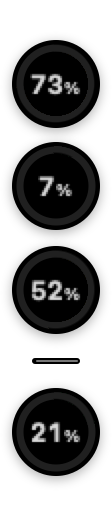
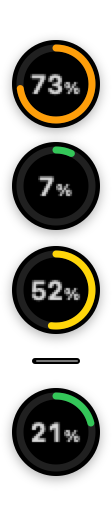
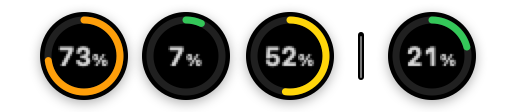
Quotch shows how much of your Claude plan you have used: the 5-hour window, the week across all models, the week on each model, and the context window of the Claude Code session you are typing in. Rings on a small floating island at the edge of the screen, and the 5-hour percentage right in the menu bar.

Not affiliated with Anthropic
Quotch is an independent app. It is not made, endorsed or supported by Anthropic. "Claude" is a trademark of Anthropic, used here only to say what the app reads.
Quotch reads the usage numbers through an internal interface of claude.ai, one that was never published as a public API. It can stop working whenever claude.ai changes.
The number you keep opening a tab for.
Claude tells you how much of your plan is left, but only if you go and look. Quotch keeps looking for you, at the edge of the screen, out of the way of your work.
Sign in to claude.ai
A login window opens inside the app, the same claude.ai page you would use in a browser. There is no account to create with us.
Four rings appear
The 5-hour window, the week across all models, the week on each model, and your Claude Code context window, read from the local transcript. The 5-hour percentage also sits in the menu bar, next to the clock.
Click a ring for the rest
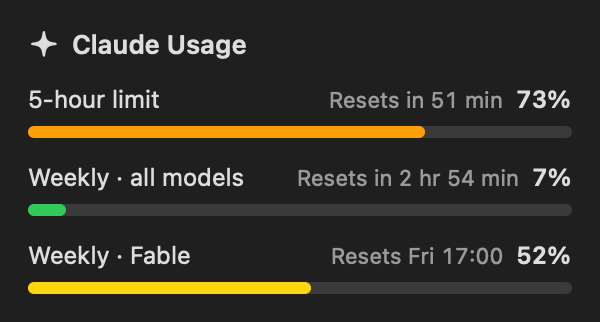
A card opens with how much is left, when it resets as a date and as time remaining, how much of the window has passed, which window it is, and when the numbers were last read.
One ring at a time.
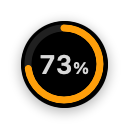

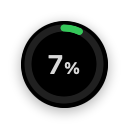

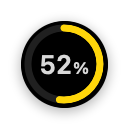


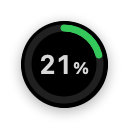

Hover, tap or Tab to a ring to see how long until it resets; its arc shows how much of the window has passed.
Small app, one job.
Four windows, four rings
The 5-hour window, the week across all models, the week on each model, and your Claude Code context window, each on its own ring, with the percentage right inside it.
The time left, at a glance
Hover over a ring and it switches to the time left until it resets, while its arc shows how much of the window has passed. The arc turns from green to red as the window runs out. Put it next to the usage arc and you see your pace.
Your look, your size
Normal or compact, light, dark or Auto. You pick both in Settings.
Wherever you want it
Drop it on the left or right edge, or along the bottom as a bar the height of the Dock. It can follow the Claude window to your other display, and it hides while an app is full screen.
Only when you need it
Show it only while you use Claude or, on a side edge, keep just the 5-hour ring until you hover. The 5-hour figure also sits in the menu bar.
Straight answers
Only the limits your account reports get a ring. When Claude itself is down, Quotch says so and can notify you if you turn notifications on in Settings. Updates install only when you press the button.
On your Mac, and nowhere else.
You sign in to claude.ai in a window inside the app. The session cookie stays on your Mac, in the app's own data, and is sent only to claude.ai. There is no account with us, no telemetry and no server of ours in the middle.
The app reads the usage numbers of your own account, the same figures claude.ai shows you. The Claude Code transcripts behind the context ring are read on your Mac and never leave it.
Free, 3.4 MB, and it can start with your Mac.
A universal build for Apple silicon and Intel, signed with an Apple Developer ID. Notarized by Apple: no “unidentified developer” warning, only the one-time confirmation macOS shows for any app from the internet. Drag it to Applications and sign in once.
- macOS 14 Sonoma or newer
- Universal binary
- Notarization ticket stapled, so the first launch works offline
The things you'd ask.
Is this made by Anthropic?
No. Quotch is an independent app, not made, endorsed or supported by Anthropic. "Claude" is their trademark, used here only to say what the app reads.
Can it stop working?
Yes. The numbers come from an internal interface of claude.ai, not from a published API, so a change on their side can break Quotch until it is updated.
Where does my claude.ai session go?
Only to claude.ai. You sign in through a window inside the app; the session cookie is kept on your Mac, in the app's own data, and is sent only to claude.ai, never to us or anyone else. There is no account with us, no telemetry and no server of ours in between.
Which numbers does it show?
Four: the 5-hour window, the week across all models, the week on each model, and the context window of your Claude Code session. Click a ring and the card adds how much is left, when it resets as a date and as time remaining, how much of the window has passed, which window it is, and when the figures were last read.
Where does the island sit?
Wherever you drop it. Grab it by any ring and drag it to the left or right edge, and it is a column of rings; drag it to the bottom and it becomes a thin horizontal bar as tall as the Dock, adjusted automatically when the Dock changes. It remembers the spot, and a button in Settings sends it straight to the bottom right corner.
Does it cover apps that go full screen?
No. The island hides itself while an app is full screen and comes back when you leave.
Which Macs does it run on?
macOS 14 Sonoma or newer, on Apple silicon or Intel. It is a universal binary.
What does it cost?
Nothing. Quotch is free.